Quiz Maker (Create Quiz /Test)5.15.7
Publisher Description
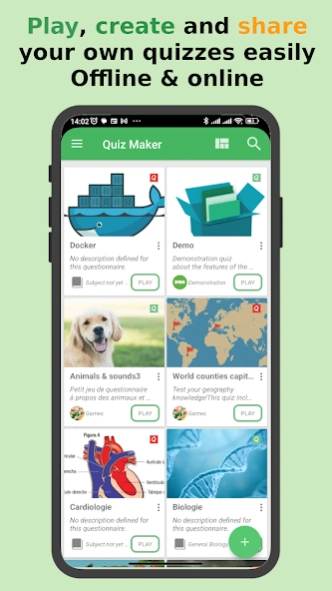


With Quiz Maker, play, create and share MCQ/quizzes & test easily.
Quiz Maker is a Mobile Application that allows you to play, create and share quizzes in a simple and intuitive way.
The questionnaires created using QuizMaker app are in the form of interactive test quizzes that may contain pictures and sounds with automatic scoring.
Thus, you can create your own quiz, play it and share it for self-evaluation or even for entertainment gaming purposes.
The Quiz Maker application offers the possibilities to:
1-Make
your own quiz by creating:
• multiple choice questions
• single answer questions
• open-ended questions
• open-ended with multiple answers
• Enumeration
• Fill in the blanks
• Put in order
• Match columns
2-Share
your creations easily as a (*.qcm file)
3-Play
quizzes you have
received
from your contacts as a simple
(*.qcm)
file or that you have created on your own! You will have the choice between the two(2) existing
play modes
: The
exam
mode (as an exam simulator) or the
challenge
mode (as a game against the clock).
Go further with your quizzes
Depending on your needs you can configure either for your quizzes or for each question and answers individually the:
- Case sensitiveness
- Help with answer entering (to show tips to help the user answer)
- The randomization strategy for your questions and answers
- Your custom scoring policy
- Images and sounds for questions, answer-proposals, comments
- Enough configurations to customize your created quizzes and and your quiz playing experience.
- Almost all you are looking for are there (And you are free to email us for suggestion to go further)
>What is a *.qcm file?
•Qcm file is file format that aims to supports interactive quizzes including pictures & sounds with automatic scoring.
•A *.qcm file is a compressed file that contains a set of questions, proposals, and answers.
•The structure of the files * .qcm makes it possible to embark among others multimedia contents such as images and sounds.
•Each * .qcm file is structured so that it is interpreted automatically by any compatible application.
Manage Files (quiz files with QCM extension)
Quiz Maker is a quiz files manager that acts as, a reader and an editor for files with *.qcm extension. It thus makes it possible to
read
and execute quiz files that are on your storage disk,
rename, copy, move or delete
them.
Moreover, from its editing feature; it allows you to edit quiz files through a simple and intuitive interface so that you can easily create your own quiz file from scratch or modify an existing one.
All quizzes you create through this app is stored on your disk as a shareable *.qcm files so that anyone with Quiz Maker or a compatible *.qcm reader can easily read and execute it.
Note that:
QuizMaker app, as a simple reader and editor for files with extension *.qcm, when you share a quiz as a simple shareable and portable *.qcm file, the receiver needs to have the QuizMaker app installed (or any other compatible *.qcm file reader) in order to play your shared Quiz file (*.qcm file)
Whether you are a teacher, student, or trainer, QuizMaker (also known as Quiz Maker) is the ultimate quiz app for education, learning, and assessment.
It’s both a powerful quiz creator and a fun game maker, perfect for training, study, or exam simulation.
With QuizMaker, you can enjoy unlimited quiz creation, quiz playing, and quiz sharing — online or offline.
Create interactive MCQ, tests, and quizzes that combine learning and playing for every kind of user.
This quiz creator app lets you design training tests, exam simulators, or fun quizzing games for classrooms and personal study sessions.
Whether it’s for teachers preparing lessons, students practicing exams, or anyone passionate about quizzing, QuizMaker turns learning into an engaging game.
With Quiz Maker, play, create and share MCQ, quizzes & tests easily. 😉
About Quiz Maker (Create Quiz /Test)
The company that develops Quiz Maker (Create Quiz /Test) is QmakerTech. The latest version released by its developer is 5.15.7.
To install Quiz Maker (Create Quiz /Test) on your Android device, just click the green Continue To App button above to start the installation process. The app is listed on our website since 2026-09-01 and was downloaded 125 times. We have already checked if the download link is safe, however for your own protection we recommend that you scan the downloaded app with your antivirus. Your antivirus may detect the Quiz Maker (Create Quiz /Test) as malware as malware if the download link to com.devup.qcm.maker is broken.
How to install Quiz Maker (Create Quiz /Test) on your Android device:
- Click on the Continue To App button on our website. This will redirect you to Google Play.
- Once the Quiz Maker (Create Quiz /Test) is shown in the Google Play listing of your Android device, you can start its download and installation. Tap on the Install button located below the search bar and to the right of the app icon.
- A pop-up window with the permissions required by Quiz Maker (Create Quiz /Test) will be shown. Click on Accept to continue the process.
- Quiz Maker (Create Quiz /Test) will be downloaded onto your device, displaying a progress. Once the download completes, the installation will start and you'll get a notification after the installation is finished.
Program Details
System requirements
Download information
Pricing
Version History
version Apex.5.15.7
posted on 2026-09-01
- Added interface customization settings
- Fixed a bug that could occasionally cause the latest editor changes to be lost
- Added the ability to duplicate a question
- Added the ability to specify which columns should be shuffled for match_columns questions
- Complete overhaul of the game interface (Challenge & Exam)
- Improved file recovery for corrupted QCM files
- Optimized media insertion to prevent crashes
- Reported bug fixes
version Apex.5.15.4
posted on 2026-07-25
- Fixed a bug that could occasionally cause the latest editor changes to be lost
- Added the ability to duplicate a question
- Added the ability to specify which columns should be shuffled for match_columns questions
- Complete overhaul of the game interface (Challenge & Exam)
- Improved file recovery for corrupted QCM files
- Optimized media insertion to prevent crashes
- Added the option to retake only missed or incorrect questions from a previous test
- Reported bug fixes
version Apex.5.15.2
posted on 2026-06-01
- Added the ability to duplicate a question
- Added the ability to specify which columns should be shuffled for match_columns questions
- Complete overhaul of the game interface (challenge and exam)
- Improved the file recovery system in case of QCM file corruption!
- Optimized the way the app adds media to the quiz in order to avoid crashes
- Added the option to partially retake a previous test with only missed or wrong questions.
- Reported bug fix!
version Apex.5.12.12
posted on 2025-10-31
- Complete overhaul of the game interface (challenge and exam)
- Improved the file recovery system in case of QCM file corruption!
- Optimized the way the app adds media to the quiz in order to avoid crashes
- Added the to partially retake a previous test with only the questions you missed or answered wrong.
- Added settings to customize the look and behaviour of the quiz player
- Reported bug fix!
version Apex.5.9.0
posted on 2025-07-20
- Improved the file recovery system in case of QCM file corruption!
- Fix a malfunction that sometimes caused the app to ignore user licence while trying to edit the media added to comment.
- Optimized the way the app adds media to the quiz in order to avoid crashes
- Added the to partially retake a previous test with only the questions you missed or answered wrong.
- Added settings to customize the look and behaviour of the quiz player
- Reported bug fix!
version Apex.5.8.2
posted on 2025-06-12
- Fix a malfunction that sometimes caused the app to ignore user licence while trying to edit the media added to comment.
- Optimized the way the app adds media to the quiz in order to avoid crashes
- Added the to partially retake a previous test with only the questions you missed or answered wrong.
- Added settings to customize the look and behaviour of the quiz player
- Reported bug fix!
version Apex.5.3.2
posted on 2024-06-06
- Added the to partially retake a previous test with only the questions you missed or answered wrong.
- Added settings to customize the look and behaviour of the quiz player
- Reported bug fix!
version Apex.5.0.14
posted on 2024-03-30
- Reported bug fix
- Fix huge bug that prevented restoration of the edited quiz when an unexpected close of the app occurs (either due to user or to crash)
- Updating buildTools to version 7.2
- Fix a major issue that caused crashes while trying to record an audio. I even caused the feature to be not usable at all.
- Added an embedded Audio recorder (No more need necessarily to install an audio-recorder app)
version Skywards.4.2.1
posted on 2023-11-19
- Fix huge bug that prevented restoration of the edited quiz when an unexpected close of the app occurs (either due to user or to crash)
- Updating buildTools to version 7.2
- Fix a major issue that caused crashes while trying to record an audio. I even caused the feature to be not usable at all.
- Added an embedded Audio recorder (No more need necessarily to install an audio-recorder app)
version Skywards.4.1.4
posted on 2023-08-23
- Updating buildTools to version 7.2
- Fix a major issue that caused crashes while trying to record an audio. I even caused the feature to be not usable at all.
- Added an embedded Audio recorder (No more need necessarily to install an audio-recorder app)
- Improving compatibility with quizzes created on QuizMaker professional
- Reported bug fix and improvement
